
10 Steps to Run a Winning Google Ads Campaign

Introduction
Google Ads is one of the most powerful ways to reach potential customers who are actively searching for your products or services. However, simply launching a campaign isn’t enough. Success comes from having the right strategy, targeting the right audience, and continuously optimizing your campaigns for better performance.
In this guide, we’ll walk you through 10 essential steps to run a winning Google Ads campaign. Whether you’re new to Google Ads or looking to improve your existing campaigns, these proven tips will help you generate more qualified leads, increase conversions, and maximize your return on investment (ROI).
Step 1 — Define Your Goal
Every successful Google Ads campaign starts with a clear objective. Before creating your campaign, decide what you want to achieve, whether it’s generating leads, increasing online sales, driving phone calls, or boosting website traffic. Your campaign goal influences everything from bidding strategy to ad copy and performance measurement. Having a well-defined objective also helps you allocate your budget more effectively and track the metrics that matter most.
Why it matters
Short explanation.
Pro Tip
A highlighted tip box.
Avoid This
A warning box with a common mistake.
Step 2 — Research High-Intent Keywords
Keywords determine when and where your ads appear. Focus on high-intent search terms that indicate users are ready to take action, such as “Google Ads agency near me” or “emergency HVAC repair.” Use Google Keyword Planner to find relevant keywords, and regularly review search terms to eliminate irrelevant traffic with negative keywords.
Recommended Tools
Google Trends
Google Keyword Planner
Google Search
Step 3 — Understand Your Target Audience
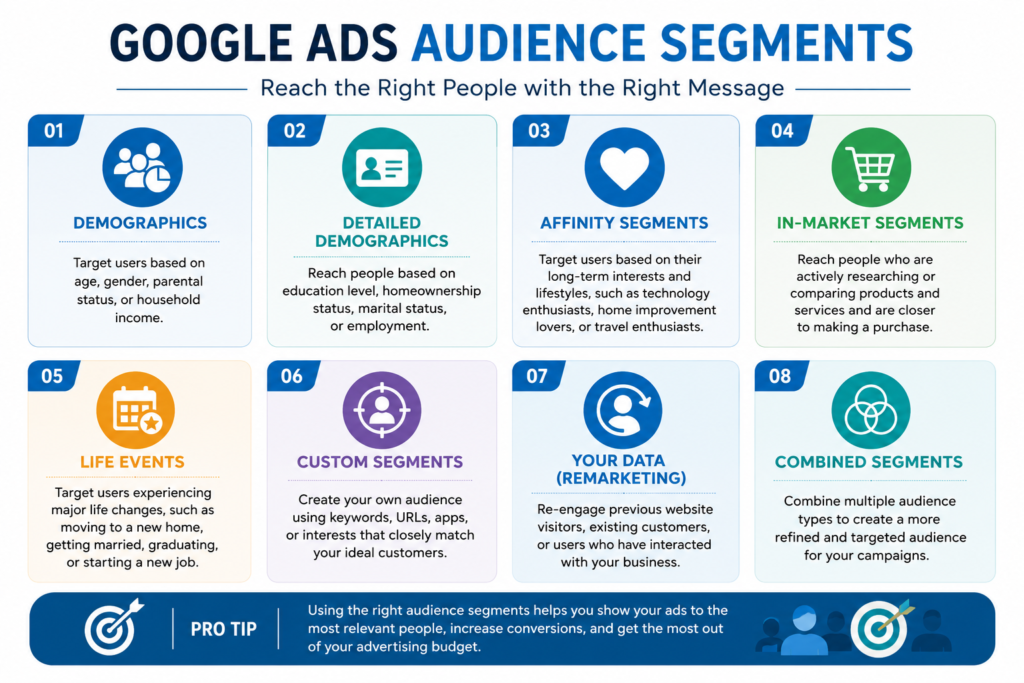
Knowing your ideal customers helps you create more relevant ads and improve conversion rates. Consider their location, demographics, interests, devices, and search intent. When your campaigns are tailored to the right audience, you can reduce wasted ad spend and attract users who are more likely to become customers.
Step 4 — Organize Your Campaign Structure
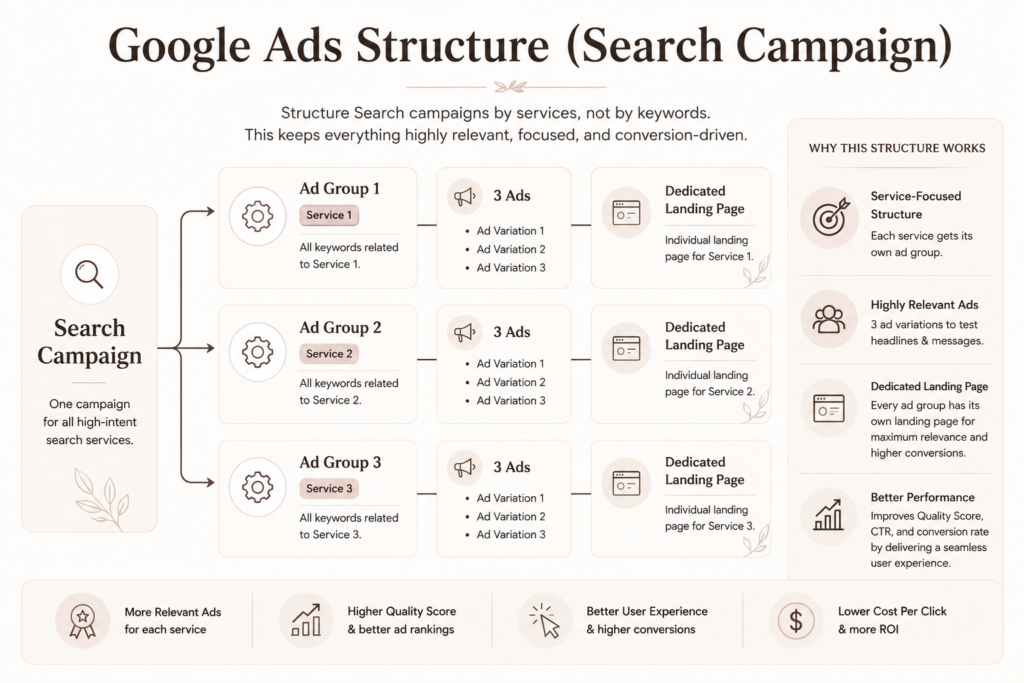
A well-organized account improves both campaign performance and management. Separate campaigns by product, service, or location, and group closely related keywords into dedicated ad groups. This structure increases ad relevance, improves Quality Score, and makes optimization much more effective over time.
Follow this small diagram :
Step 5 — Write Ads that actually converts
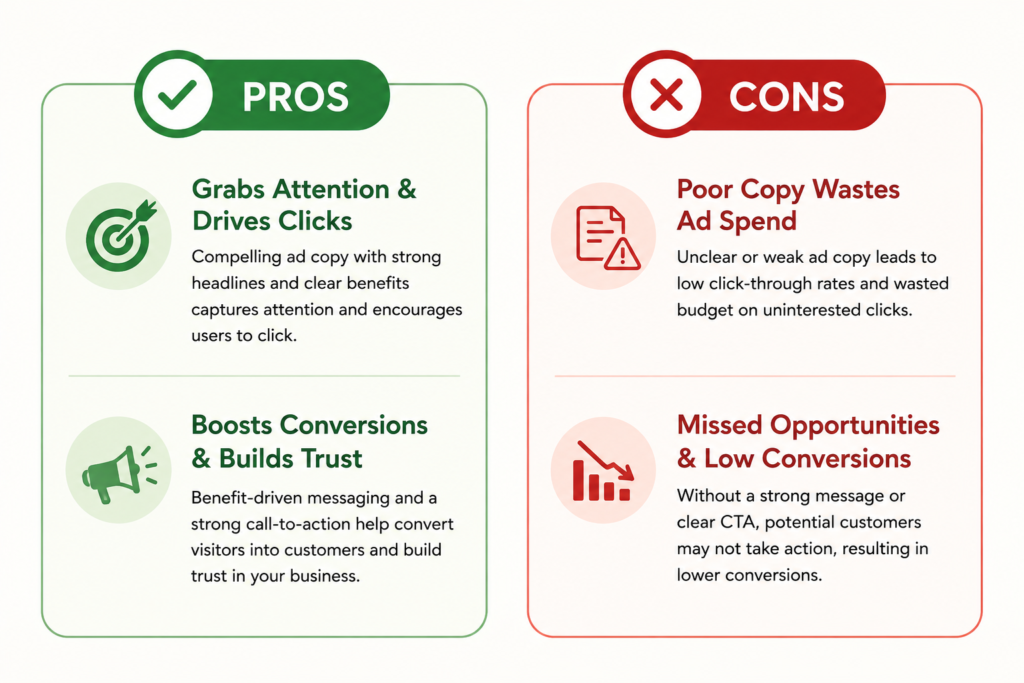
Your ad is often the first impression potential customers have of your business. Write clear, benefit-driven headlines that include your primary keywords and explain why users should choose you over competitors. Finish with a strong call-to-action, such as “Get a Free Quote” or “Book Your Consultation Today.”
Step 6 — Set the Right Budget & Bidding Strategy
To calculate your Google Ads daily budget, work backward from your revenue goals. Determine how many leads or sales you need, multiply by your target Cost Per Acquisition (CPA), and divide by the days in a month
Here are the step-by-step methods to calculate your budget:
1. Reverse-Engineer from Revenue Goals (The Best Method)
If you know your sales goals, break down the math to find your required daily spend:
Required Clicks: Divide your target number of monthly conversions by your average Conversion Rate (CVR).
- Total Monthly Budget: Multiply the required clicks by your estimated Cost Per Click (CPC).
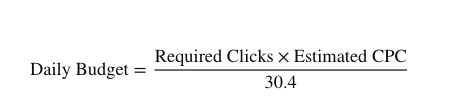
- Daily Budget: Divide your total monthly budget by 30.4 (the average number of days in a month)
As a formula:
2. Industry Benchmark Method (For Beginners)
If you don’t have historical data yet, you can estimate your starting daily budget using market averages.
Find your estimated CPC: Use the Google Keyword Planner tool to see what competitors pay for your target keywords.
- Set your baseline: A common rule of thumb is to set your daily budget to at least 10 to 20 times your estimated average CPC. This ensures the algorithm has enough data to gather clicks and exit the initial learning phase.
3. Calculating Daily from Monthly
If you already have a set monthly marketing budget in mind, use Google’s standard conversion math:
- Divide your total monthly spend by 30.4.
- Example: If your monthly budget is $304, your daily budget is $10.
Keep in mind that Google Ads may spend up to 2 times your average daily budget on days when search traffic is high. However, Google ensures that over the entire month, you will never be charged more than your daily budget multiplied by 30.4
BIDDING
Your bidding strategy tells Google how to optimize your budget to achieve your campaign goals. Whether your objective is getting more clicks, generating leads, increasing sales, or maximizing revenue, selecting the right bidding strategy can significantly improve your campaign performance. Always choose a strategy that aligns with your business objectives and available conversion data.
| Goal | Recommended Strategy |
|---|---|
| Leads | Maximize Conversions |
| Sales | Target ROAS |
| New Account | Maximize Clicks (temporary) |
Would you like to share your target revenue goal, your industry and product/service, so I can help estimate a sample budget for you?
Step 7 — Create a High-Converting Landing Page
Even the best ads won’t deliver results if your landing page doesn’t convert visitors. Ensure your landing page matches your ad message, loads quickly, is mobile-friendly, and includes a clear call-to-action. Add trust signals like testimonials, certifications, or case studies to increase credibility and encourage conversions.
Instead of paragraphs:
✓ Fast Loading
✓ Mobile Friendly
✓ Clear CTA
✓ Reviews
✓ Trust Badges
✓ Contact Form
Step 8 — Set Up Conversion Tracking
Conversion tracking allows you to measure what happens after someone clicks your ad. Track important actions such as form submissions, phone calls, purchases, or appointment bookings using Google Ads, Google Tag Manager, and GA4. Accurate tracking provides the data needed to optimize campaigns and improve your return on investment.
Checklist format:
☐ Phone Calls
☐ Forms
☐ Sales
☐ GA4
☐ GTM
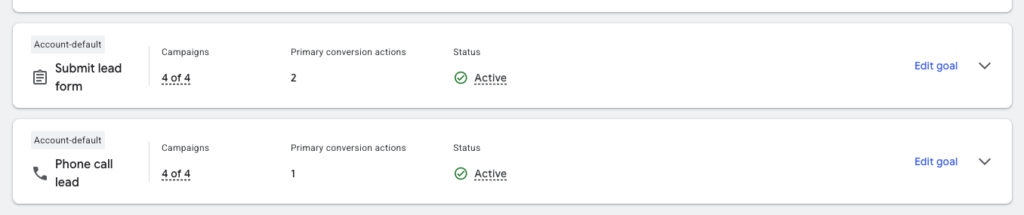
This is an example for Leads based business and Submit leads conversion goal is set up as a Primary action.
Step 9 — Monitor & Optimize Your Campaign
Google Ads isn’t a “set it and forget it” platform. Regularly review your search terms, pause underperforming keywords, test new ad variations, and add negative keywords to reduce wasted spend. Ongoing optimization helps improve click-through rates, lower cost per conversion, and maximize campaign performance over time.
Daily Google Ads Optimization Checklist:
- Review campaign spend and ensure it stays within budget.
- Check for any disapproved ads or policy issues.
- Monitor conversions, CPA, and ROAS for unusual changes.
- Review Search Terms Report and add new negative keywords.
- Pause keywords or ads with poor performance.
- Check impression share and lost impression share due to budget or rank.
- Review bid strategy performance and make adjustments if necessary.
- Monitor CTR, CPC, and Conversion Rate across campaigns.
- Ensure conversion tracking is recording accurately.
- Compare today’s performance with the previous 7–30 days before making major changes.
- Review competitor insights (Auction Insights) for changes in competition.
- Document all optimization changes in a change log for future analysis.
Step 10 — Measure Performance & Scale What Work
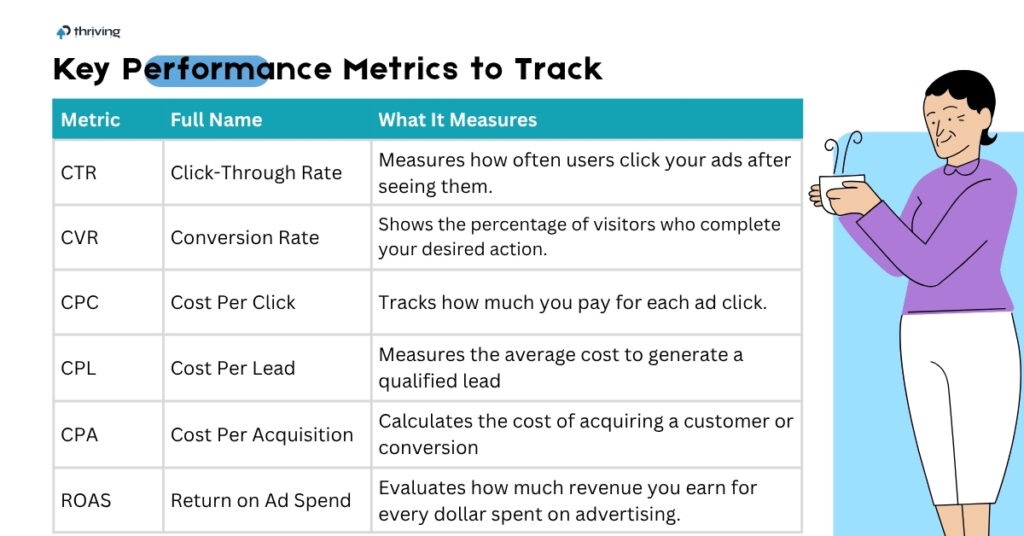
Analyze key performance metrics such as Click-Through Rate (CTR), Conversion Rate, Cost Per Lead (CPL), and Return on Ad Spend (ROAS). Identify your highest-performing campaigns and gradually increase their budget while continuing to test and optimize. Scaling successful campaigns strategically allows you to grow your business while maintaining profitability.